

Most SaaS companies drop a feedback form somewhere on their site and call it done. A star rating here, an NPS survey there, maybe a support ticket system tucked in a corner. Then they wait.
What comes back? Things like “not working,” “hard to use,” or “needs improvement.”
Useful? Not really.
These short responses confirm that something went wrong. But they never tell you what exactly broke, why it happened, or how frustrated the user actually was. So you end up guessing.
That is where voice feedback in SaaS product development changes things. When users speak instead of typing, they naturally walk through the steps they took, the result they expected, and the exact moment things fell apart. You stop guessing and start understanding.
In this post, we will cover what voice feedback is, why more SaaS teams are using it, and how you can use it to make faster, smarter product decisions.
What Is Voice Feedback in SaaS Product Development?
Voice feedback is a product feedback method where users record spoken comments instead of filling out text forms. This gives SaaS teams richer qualitative insights, along with the tone and context that typed responses simply cannot carry.
Think about it this way: when something confuses or frustrates a user, they rarely type out a full explanation. But ask them to talk about it? Most people will describe exactly what they did, what they expected, and where things went sideways.
How It Differs from Surveys and Feature Voting
Traditional surveys lock users into predefined options. Feature voting tools tell you what people want, but not why they want it or how urgently they need it.
Voice feedback is open-ended. Users speak freely and naturally cover things you would never think to ask. No typing friction. No character limits. No checkboxes that force a structured answer onto an unstructured problem.
A user takes about 20 seconds to leave a voice message. A detailed text survey can take 5 to 10 minutes. That gap in effort directly affects how many people actually respond.
Why Spoken Feedback Reveals Better Product Insights
When users speak, you hear everything. You hear hesitation when something confuses them. You hear excitement when something finally clicks. You hear real frustration when they have hit the same wall multiple times.
A user describing a broken workflow might say:
“I uploaded the file, waited for it to process, then clicked export. Nothing downloaded. I tried again. Same thing. I have no idea if it actually exported or not.”
That one recording is a bug report, a UX insight, and a prioritization signal all at once. No form would have captured that level of detail.
Explore Introducing Voice Feedback: Let Your Users Speak Their Minds!
Why SaaS Teams Are Moving Beyond Traditional Feedback Forms
Text forms were never designed for nuance. They were built for speed. But somewhere along the way, teams started treating short text responses as meaningful product data. They are not.
Low Response Rates from Long Forms
Survey fatigue is a real problem. When users see a long feedback form, most of them leave without completing it. The ones who do respond tend to be outliers, either extremely happy or extremely frustrated. You miss the quiet majority where most of your actual users sit.
Text Responses Are Often Too Short to Be Useful
Even when users fill out a form, the responses are usually thin. Words like “bug,” “slow,” or “fix this” show up constantly. These tell you a problem exists. They tell you almost nothing about why it exists or how to fix it.
Users Explain Problems Better Out Loud
People are naturally built to tell stories, not fill out forms. When users speak, they describe the steps they took, the result they expected, and the exact moment something broke. They mention workarounds they tried, edge cases they ran into, and how the issue affected their work.
That kind of detail is exactly what product teams need to make good decisions.
7 Real Ways SaaS Companies Use Voice Feedback to Improve Their Products
1. Discover UX Friction Faster
Text feedback tells you something is broken. Voice feedback tells you where, when, and why.
A user might say: “I clicked save but expected it to publish automatically. I had no idea those were two separate steps until my manager asked why the page was still showing as draft.”
Your product team now knows exactly which UI assumption is creating confusion. And when three more users say the same thing, the pattern becomes impossible to ignore.
Voice feedback works especially well for:
- Onboarding flows where users are still learning the product
- Dashboard layouts that feel obvious internally but confuse new users
- Checkout or upgrade flows where friction directly costs you revenue
- Multi-step workflows where users can get lost between stages
2. Prioritize Feature Requests with Real User Context
Feature voting shows you what users want. Voice feedback shows you why they want it, who actually needs it, and what they are doing in the meantime without it.
That context matters more than you might think. Two features might each have 50 votes. But if one of them has users explaining how it is blocking their entire team’s workflow every single day, that feature moves to the top. The other one with 50 “would be nice” votes sits further down the list.
Voice feedback surfaces that prioritization signal automatically.
3. Improve Onboarding Experiences
Onboarding is the most critical window in the user lifecycle. Users form their first impressions fast, and every moment of confusion during those early sessions increases the chance of churn.
With voice feedback, new users can record their first impressions right after signing up. They can describe which steps felt unclear, which labels confused them, and where they were not sure if they had done something correctly.
This works far better than sending a survey three days later. By then, users have either figured it out on their own or already moved on.
4. Reduce Support Tickets by Catching Repeated Pain Points Early
Every support ticket costs time. And most tickets reflect a product problem that should have been addressed long before it reached your support queue.
Voice feedback helps you catch these patterns earlier. When five different users mention they cannot find the export settings, that is not a support issue. That is a navigation problem. Fix it once, and you prevent dozens of future tickets from ever being created.
Because users describe their problems in natural language, recurring themes become obvious quickly. You do not need to read between the lines.
5. Validate New Feature Releases
Shipping a feature is not the finish line. It is the starting point.
After launching a beta feature, a UI update, or a workflow change, the real question is: are users actually getting it? Voice feedback gives you immediate reactions from real users in their own words, while the experience is still fresh.
You might find that the new feature works well but sits in the wrong part of the interface. Or that users like the concept but are thrown off by the terminology you used. These are things you can fix before the feature rolls out to everyone.
6. Capture Customer Emotion for Smarter Prioritization
This is a signal most product teams completely miss.
Not every bug needs the same priority. Not every feature request is equally urgent. The best prioritization decisions account for how strongly users actually feel about an issue.
With text feedback, all frustration looks the same. With voice, you can clearly hear the difference between a mild annoyance (“it is a bit inconvenient”) and a real blocker (“I literally cannot finish my work until this gets fixed”). You can also hear genuine excitement around a feature that tells you users are eager, not just passively interested.
Emotion is a prioritization signal. Voice feedback makes that signal hard to ignore.
7. Collect Mobile-Friendly Feedback Instantly
Typing detailed feedback on a phone is frustrating. Nobody wants to tap out a multi-paragraph explanation on a small screen after an already bad experience.
Speaking is natural on mobile. For SaaS products with mobile dashboards, field apps, CRM tools, or LMS systems, this matters a lot. Users can record a quick voice message in under 15 seconds and move on with their day. The result is more feedback, from more users, across more touchpoints.
Check also Voice Feedback vs Survey Forms: Which Gets More Responses on WordPress?
How Product Teams Turn Voice Feedback into Actionable Insights
Collecting voice feedback is just the first step. The real value comes from building a lightweight process around what you hear.
Step 1: Collect Feedback at the Right Touchpoints
You do not need voice feedback on every page. Focus on the moments that matter most:
- Right after a user completes onboarding
- After someone uses a new feature for the first time
- Following a support interaction
- After a workflow fails or times out
Prompting users at these specific moments means their feedback is fresh and specific, not a vague general impression.
Step 2: Group Recurring Pain Points
Listen for themes. The same issues will start coming up across different recordings. Group them into categories like UX confusion, bugs, missing features, or unclear labeling.
You do not need any specialized tools to do this. A simple spreadsheet with a tag column works perfectly well when you are starting out.
Step 3: Prioritize by Frequency and Business Impact
Some issues affect many users but cause low disruption. Others affect fewer users but block critical workflows entirely. Good prioritization weighs both frequency and business impact together.
Voice feedback makes this easier because users naturally explain the impact themselves. They tell you what they could not get done, how long they spent on a workaround, and whether the issue made them think about switching tools.
Step 4: Feed Insights into Sprint Planning
Take your grouped and prioritized themes directly into sprint planning. Product managers can share relevant recordings in team discussions. Engineers hear the exact words a user used to describe a bug. Designers hear how a user expected the interface to behave.
When the whole team hears feedback straight from users, alignment happens faster and decisions feel more grounded in reality.
Read also Text Comments vs Voice Comments in WordPress: Boosting Engagement.
Why WordPress SaaS Websites Need a Voice Feedback Tool
If your SaaS product runs on or alongside a WordPress site, you already have a direct channel to your users. Most SaaS companies use WordPress for their marketing pages, documentation, client portals, onboarding pages, and knowledge bases.
These are exactly the places where users form opinions, hit points of confusion, and decide whether to stay or leave.
Adding a product feedback tool for WordPress means you capture that feedback in the moment, without redirecting users to a separate survey platform or asking them to open a new tab.
Most teams are not taking advantage of this yet. A user voice input plugin makes it easy to collect audio responses directly on your site without any complicated setup or third-party integrations.
Check out the 3 Best Voice Feedback WordPress Plugins to Collect User Feedback in Realtime.
How Voice Feedback Makes This Process Easier
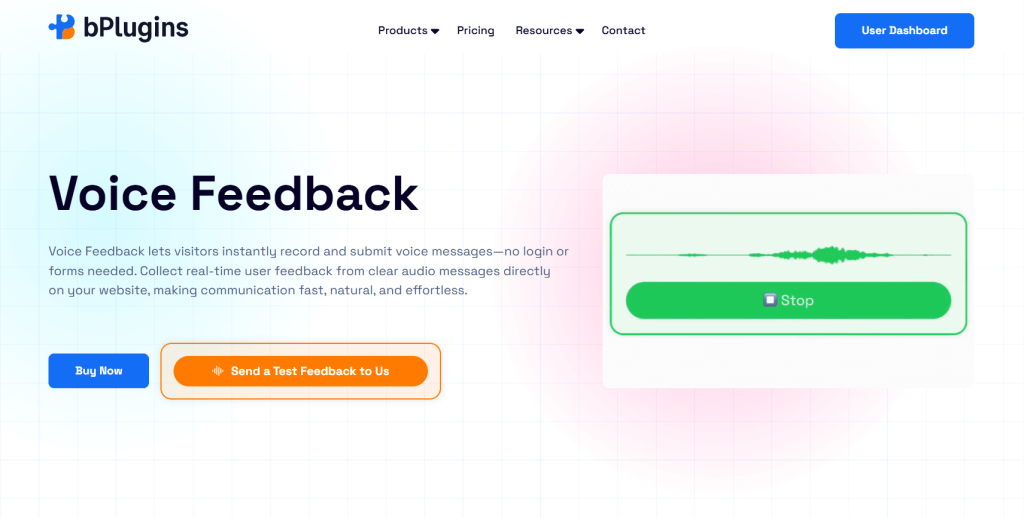
Voice Feedback is a WordPress plugin built for exactly this kind of qualitative feedback collection.
You can embed a voice recorder anywhere on your WordPress site. It works as a floating drawer button that appears across all your pages, a Gutenberg block you can place on any specific post or page, or a shortcode for custom placement wherever you need it.
Users do not need an account to leave feedback. They click record, speak, and submit. No forms, no login, no friction at all.
Every submitted recording goes straight to your admin dashboard. You can listen to each message, mark it as resolved, or delete it. The Pro version adds admin email notifications so you hear about new feedback right away, screen recording so users can show you exactly what they experienced, and advanced display triggers that let you control when and where the feedback prompt appears.
For teams collecting feedback from mobile users, the experience is especially smooth. A user on mobile can record a message in seconds, which means you actually hear from them instead of hoping they will complete a text form.
Best Places to Add Voice Feedback on a SaaS Website
Where you place your voice feedback prompt matters just as much as having it. Here are the spots that consistently produce the most useful responses:
Onboarding completion page – Users just went through your entire setup process. Ask them what felt confusing before that memory fades.
Feature announcement pages – When you ship something new, give users an immediate channel to react. You will learn things you did not expect.
Support article pages – If a user is reading a help doc, something has already gone wrong. Let them tell you what it is instead of leaving quietly.
Pricing page – Users who visit your pricing page but do not convert often have specific objections. Voice feedback surfaces those objections clearly.
Customer dashboard – Your most active users spend the most time here. They have real opinions about what works and what slows them down.
Beta release pages – Early adopters of a new feature are your best source of honest validation. They will tell you things your team missed.
Cancellation flow – This is one of the highest-value feedback moments you have. Let users explain in their own words why they are leaving.
FAQs on Adding Voice Feedback to Improve SaaS Product Development
Is voice feedback better than survey forms for SaaS?
For collecting rich qualitative insights, yes. Voice feedback captures emotion, context, and detail that short text responses simply miss. Surveys are still useful for tracking specific metrics at scale. But if you want to understand the why behind your numbers, voice feedback gives you that far more clearly.
Where should SaaS companies collect voice feedback?
The highest-value touchpoints are onboarding completion pages, feature release pages, support articles, cancellation flows, and your customer dashboard. These are moments when users have something specific and often urgent to share.
Can WordPress websites collect voice feedback?
Yes. A plugin like Voice Feedback lets you embed a voice recording field anywhere on your WordPress site using a block, shortcode, or floating drawer. Users do not need to log in or provide any personal details.
How do product teams analyze audio feedback?
The simplest approach is to listen through recent recordings, tag each one by theme (UX, bug, feature request, etc.), and group recurring themes together. You do not need specialized software to start. A basic tagging system in a spreadsheet handles the job well in the early stages.
Does voice feedback improve feature prioritization?
It does, specifically because users naturally communicate urgency and emotion when speaking. Hearing someone say “I cannot finish my work without this” carries far more weight than reading a vote in a feature request tracker.
Conclusion: Better Products Start with Better User Insight
SaaS companies improve faster when they actually hear what users experience, not just read a one-line complaint about it.
Voice feedback in SaaS product development gives your team the context, emotion, and detail needed to make smarter decisions. It closes the gap between what users type and what they actually mean. And once you start hearing your users instead of just reading their responses, you will not want to go back.
If you run a WordPress-based SaaS product or marketing site, Voice Feedback is one of the simplest ways to start collecting that kind of honest, usable feedback. You can embed it anywhere on your site, collect audio responses without any friction, and hear directly from your users in their own words.
That is where better products actually start.

 Save 90%